Introduction
Technical SEO is the backbone of any successful website. You may have great content and strong backlinks, but if your website is slow, hard to crawl, or poorly structured, search engines won’t give it the visibility it deserves. Technical SEO makes sure that your website is built correctly so search engines can easily crawl, index, and understand each page.
In this blog, you will learn what technical SEO is, why it is important, how search engines work, and how to fix common issues. Let’s get started.
What Is Technical SEO?
Technical SEO refers to improving the internal structure and technical setup of your website so search engines can easily crawl, read, and index your pages.
While on-page SEO focuses on content, and off-page SEO focuses on backlinks, technical SEO focuses on how your website actually functions behind the scenes.
Simple example:
If your website is like a car, then technical SEO is the engine. You may paint the car beautifully (content), but if the engine is weak, the car will not perform well.
Technical SEO includes tasks like:
- Improving website speed
- Fixing broken links
- Making the site mobile-friendly
- Using secure HTTPS
- Adding structured data
- Creating a proper sitemap
- Managing duplicate content
- Improving crawlability
Why Technical SEO Matters
Technical SEO plays a big role in how your website ranks. Even if your content is excellent, technical problems can stop your pages from appearing in search results.
Here’s why technical SEO is important:
Search engines understand your website better
Google cannot see your website like humans do. It reads code and links. If the structure is messy, Google may ignore or misunderstand your pages.
Helps pages get indexed
Pages that are slow, broken, or blocked might never get indexed. If a page is not indexed, it cannot appear in search results.
Improves user experience
Technical SEO creates a smooth, safe, and fast experience for visitors, which increases engagement and reduces bounce rate.
Prevents ranking issues
Error pages, duplicate content, and slow loading can drop your rankings instantly.
Supports content and backlinks
Your SEO efforts work best when your website has a solid technical base.
How Search Engines Crawl and Index Websites
Before optimizing your website, it’s important to know how search engines work.
Crawling
Search engines send bots (also called crawlers) to scan your website. These bots follow links from one page to another. If a page has no links pointing to it or is blocked, Google may not crawl it.
Indexing
After crawling your page, Google stores the page in its index (database). Only indexed pages can appear in search results.
Ranking
Once a page is indexed, Google evaluates it based on:
- Page speed
- Content relevance
- User experience
- Mobile-friendliness
- Security
- Backlinks
Your ranking depends on how well your page meets Google’s expectations.
Website Architecture and URL Structure
A good website structure helps both users and search engines move through your site easily.
Clear Navigation
Your menus and internal links should help users find content quickly. Avoid complicated menus or too many levels of pages.
Simple URL Structure
A URL should be short, clean, and easy to understand.
Examples:
Good: /services/digital-marketing
Bad: /serv123?=mk998&cat=4
Important Pages Should Be Easily Accessible
If a user needs 5–6 clicks to reach your main page, it is too far. Google also prefers pages that are close to the homepage.
Use Breadcrumbs
Breadcrumbs show users where they are on the site. They also help Google understand your page hierarchy.
Website Speed Optimization
Website speed is one of the most important ranking factors today.
Why Speed Matters
- Slow websites frustrate visitors
- People leave pages that take too long to load
- Search engines penalize slow websites
- Speed affects conversion, sales, and engagement
How to Improve Page Speed
- Compress images
- Enable browser caching
- Reduce unnecessary scripts
- Remove heavy plugins
- Use a fast server
- Minimize CSS and JavaScript
- Delete unused code
- Enable lazy-loading for images
A faster website gives users a smoother experience and boosts SEO performance.
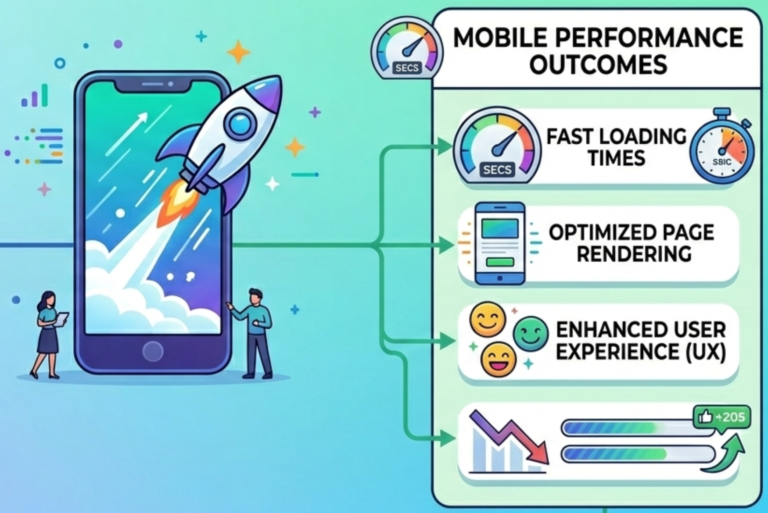
Mobile Friendliness
Since most users browse using smartphones, Google uses mobile-first indexing.
Responsive Design
Your website should automatically adjust for mobile, tablet, and desktop.
Easy Navigation on Mobile
- Buttons should be easy to tap
- Text should be easy to read
- Images should fit the screen
- Menus should be simple
Google Prioritizes Mobile Version
If your mobile version is slow or poorly designed, it directly affects your ranking, even if the desktop version is perfect.
HTTPS and Website Security
Google prefers secure websites because they protect users.
Why Shift to HTTPS
HTTPS encrypts user data and prevents hacking. Websites with only HTTP are marked as “Not Secure.” Users may leave immediately if they see this warning.
SSL Certificate
Installing an SSL certificate ensures a secure connection between the browser and your website.
Ranking Advantage
Google gives preference to secure websites.
XML Sitemaps and Robots.txt
These two files guide search engines.
XML Sitemap
A sitemap is like a map that lists your important pages. It helps Google discover and index your content faster.
Robots.txt File
This file gives instructions to search engine bots. You can allow or block certain pages, such as admin pages or duplicate content.
Submitting Your Sitemap
You can submit your sitemap in Google Search Console to speed up indexing.
Structured Data (Schema Markup)
Schema markup is a special code that explains your content clearly to search engines.
Benefits of Schema
It helps your pages qualify for rich results like:
- Reviews
- FAQ snippets
- Ratings
- Products
- Recipes
- Events
- How-to sections
These rich snippets attract more clicks.
Helps Search Engines Understand Your Content
Schema tells Google what your page is about in detail. Example: whether “Apple” refers to a fruit or a company.
Canonical Tags
Canonical tags prevent duplicate content issues.
Why Duplicate Content Happens
Sometimes the same content appears on multiple URLs due to:
- Filters
- Sorting
- HTTP vs HTTPS
- Mobile vs desktop pages
Canonical Tag Purpose
It tells Google which version of the page is the original.
Helps Avoid Ranking Problems
Google won’t split ranking power across multiple duplicate URLs.
Pagination and Parameter Handling
Large websites often use pagination and filters.
Pagination
For blogs or products spread across pages (page 1, 2, 3), Google should understand the sequence.
URL Parameters
URLs with parameters like ?color=black or ?sort=price can create duplicate pages. Proper handling prevents SEO issues.
Fixing Broken Links (404 Errors)
Broken links harm both users and search engines.
Why Broken Links Are Bad
- They waste crawl budget
- They frustrate users
- They reduce trust
- They cause ranking issues
How to Fix
- Redirect broken URLs to relevant pages
- Remove outdated links
- Create a helpful 404 page with suggestions
Redirects (301 and 302)
Redirects are used when pages move or are replaced.
301 Redirects
Permanent redirects. Best for moved or deleted pages.
302 Redirects
Temporary redirects. Used only when a page will return soon.
Why Redirects Matter
They preserve ranking power and guide users correctly.
Duplicate Content Issues
Duplicate content confuses search engines.
Common Causes
- Similar product pages
- URL variations
- Printer-friendly versions
- HTTP/HTTPS mix-ups
Fixing Duplicate Pages
- Canonical tags
- Redirects
- Blocking in robots.txt
- Using correct URL parameters
Image Optimization
Images make your website attractive but can slow it down if not optimized.
Compress Images
Smaller images load faster.
Add Alt Text
Alt text helps Google understand what the image is about. It also improves accessibility for visually impaired users.
Choose the Right Format
WebP is faster and lighter than JPG or PNG.
Log File Analysis
Log files show how search engine bots crawl your website.
Why It’s Useful
You can see:
- How often Google crawls your site
- Which pages are crawled most
- Errors bots face
- Wasted crawl budget
Improve Crawl Efficiency
Fix issues based on log file insights to help Google crawl important pages more often.
Crawl Budget Optimization
Your crawl budget is the number of pages Google chooses to crawl on your site.
Why Crawl Budget Matters
If your website is large, Google may not crawl every page daily.
Important pages might get missed.
How to Improve Crawl Budget
- Remove unnecessary pages
- Fix broken links
- Improve speed
- Reduce duplicate content
- Strengthen internal links
Core Web Vitals
Core Web Vitals measure real user experience on your website.
The Three Main Metrics
LCP (Largest Contentful Paint) – How fast the main content loads.
INP / FID (Responsiveness)- How quickly your site responds to clicks.
CLS (Cumulative Layout Shift)- How stable the page layout is (no jumping elements).
Why Core Web Vitals Matter
Google uses these metrics to decide how user-friendly your site is. Better scores lead to better ranking and happier users.
Important Technical SEO Tools
These tools help identify and fix technical SEO problems.
Useful Tools
- Google Search Console
- Google PageSpeed Insights
- Lighthouse
- Screaming Frog
- Ahrefs
- Semrush
- GTmetrix
Why These Tools Matter
They show real issues that affect your ranking and help you improve your website step by step.
Why Regular Technical SEO Audits Are Important
Technical SEO is not a one-time job.
Benefits of Regular Audits
- Find errors early
- Improve speed
- Fix broken pages
- Update sitemap
- Improve crawlability
- Boost ranking stability
What to Check in Each Audit
- Broken links
- Server errors
- Redirect issues
- Duplicate content
- Sitemap problems
- Robots.txt mistakes
- Mobile-friendliness
- Security issues
- Core Web Vitals
Server Response Codes and Their Impact on SEO
Server response codes tell search engines what is happening on your website when a page is loaded.
Important codes to know:
- 200 – OK
The page is working correctly. - 301 – Permanent Redirect
Redirects users and bots to a new URL. - 302 – Temporary Redirect
Should be used only for short-term redirects. - 404 – Page Not Found
Happens when a page is missing or deleted. Too many 404s can harm SEO. - 410 – Gone
Tells search engines that the page is permanently removed. - 500 – Server Error
A serious problem on the server side. Needs immediate fixing.
Keeping your server codes clean helps search engines crawl your site smoothly.
Website Hosting and SEO
Your hosting provider also affects your technical SEO.
How hosting impacts SEO:
- Slow servers = slow website
- Frequent downtime = lost traffic
- Weak security = higher risk of hacking
- No backup options = data loss
Choose hosting that offers:
- Fast loading speed
- High uptime (99.9%)
- Secure servers
- Daily backups
- Support for HTTPS
Good hosting gives your website a strong and stable foundation.
CDN (Content Delivery Network)
A CDN speeds up your website by storing your content on servers around the world.
Benefits of using a CDN:
- Faster loading for users in all regions
- Reduced pressure on your main server
- Better security
- Higher reliability during traffic spikes
CDNs are especially helpful for websites with global visitors.
Image Lazy Loading
Lazy loading means images load only when a user scrolls to them.
Why lazy loading helps:
- Speeds up initial page load
- Saves data for mobile users
- Improves Core Web Vitals
- Gives a smoother browsing experience
It’s a simple technique that dramatically improves page performance.
Minifying CSS, JS, and HTML
Minification removes extra spaces, comments, and characters from code files.
Why it matters:
- Makes your website lighter
- Boosts loading speed
- Reduces server load
Tools like Minify, UglifyJS, and online compressors can help.
Preloading, Prefetching & Preconnecting
These techniques help the browser load resources faster.
Preloading:
Helps browsers load important files early.
Prefetching:
Loads files the user may need in the next step.
Preconnecting:
Creates early connections to required domains. These methods improve perceived speed and smooth navigation.
Managing Website Scripts
Too many scripts slow down your page.
Tips:
- Remove unnecessary tracking codes
- Combine multiple JavaScript files
- Move heavy scripts to the bottom of the page
- Avoid large pop-ups that block loading
Keeping scripts lean improves performance.
AMP (Accelerated Mobile Pages)
AMP creates ultra-fast versions of web pages for mobile devices.
Benefits:
- Very fast loading
- Good for news and blogs
- Improves mobile experience
AMP is optional now, but some websites still use it for better speed.
Hreflang Tags for International Websites
If your website targets multiple countries or languages, hreflang tags help Google show the correct version to the right user.
Example:
- A user in UAE should see the Arabic page
- A user in India should see the English page
This avoids confusion and duplicate content problems.
JavaScript SEO
Many websites rely on JavaScript for design and functionality, but Google may struggle to read it properly.
To optimize JavaScript for SEO:
- Avoid blocking important content behind scripts
- Use server-side rendering where possible
- Make sure important text isn’t hidden
- Test your pages with Google Search Console
This ensures your JavaScript-heavy website can still rank well.
Avoiding Over-Indexing
Sometimes Google indexes pages that are not useful (such as filters, admin pages, tags).
These pages should be blocked:
- Admin dashboards
- Author pages
- Category pages (if low quality)
- Tag pages (if duplicate content)
- Filter URLs like ?sort=price
This helps Google focus on your important pages.
Monitoring Website Logs
Your server logs store info about how bots and users interact with your site.
Log files can tell you:
- Which pages Google visits the most
- Crawl errors
- Slow-loading areas
- Crawl patterns
- Unwanted bot activity
Regular monitoring helps keep your site clean and healthy.
Ensuring Consistent Website Versions
Your website should have only one correct version indexed.
Avoid having:
- HTTP and HTTPS
- www and non-www
- duplicate domain variations
Choose one version and redirect everything else to it. This strengthens ranking signals.
Dealing With Thin Content (Very Short Pages)
Pages with very little information look low-quality to Google.
Ways to fix thin content:
- Add more useful information
- Combine similar pages
- Remove outdated pages
- Improve layout and structure
Strong, detailed content performs better in search results.
Structured Navigation With Internal Linking
Internal links guide users and search engines.
Best practices:
- Link related pages
- Create hub (pillar) pages
- Use descriptive anchor text
- Avoid broken internal links
- Keep important pages closer to homepage
Internal links help distribute ranking power.
Avoiding Orphan Pages
Orphan pages have no internal links pointing to them.
Google may never discover them.
Fix orphan pages by:
- Adding internal links
- Including them in navigation
- Adding them to the sitemap
Managing Website Migration
When redesigning or changing domains, SEO often gets damaged.
Steps for safe migration:
- Use proper 301 redirects
- Update sitemap
- Update internal links
- Test all redirects
- Monitor Google Search Console
A messy migration can destroy existing rankings.
Improving Time to First Byte (TTFB)
TTFB measures how fast the server responds.
Ways to improve TTFB:
- Use better hosting
- Enable caching
- Use a CDN
- Optimize database
- Reduce server load
Fast TTFB = faster website = better SEO.
Using Caching for Speed
Caching stores parts of your website so it loads faster the next time.
Types of caching:
- Browser caching
- Server caching
- CDN caching
This reduces loading time and improves ranking signals.
Monitoring Indexing Issues in Search Console
Google Search Console shows which pages are indexed and which are blocked.
Common indexing issues include:
- Blocked by robots.txt
- Duplicate pages
- Redirect errors
- Soft 404 pages
- Crawled but not indexed
- Alternate page with canonical tag
Fixing these ensures your pages appear in search results.
Conclusion
Technical SEO may seem complex at first, but once you understand the basics, it becomes much easier. It is not about coding or advanced technology; it’s simply about making your website clean, fast, organized, secure, and easy for search engines to crawl.
A strong technical foundation helps your content perform better, improves user experience, and increases your chance of ranking higher in search results. When your website loads quickly, works smoothly on mobile devices, has clean URLs, and is free from errors, both users and search engines trust it more.
If you want long-term SEO success, technical SEO is something you cannot ignore. With regular audits and continuous improvements, your website can stay healthy and perform well in search rankings for years.